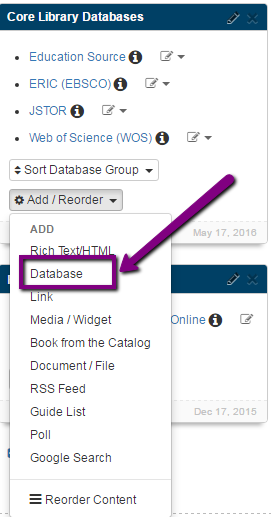
To link to library databases found in the Database A-Z List:
The most important content should occupy the best real estate: the left hand column and the top of each page.
Most users will not scroll; instead, they will click away and look somewhere else.
Images can liven up a page, break up text, and provide graphical clues about content.
It's important to adhere to copyright and accessibility standards when using images.
Useful resources for adding images:
Take advantage of LibGuides Web 2.0 features to include resources like podcasts, videos, and journal RSS feeds. These can be used to supplement text or instead of text as they may illustrate ideas more easily.
It's important to adhere to copyright standards when using multimedia.
Links to resources should be added as link assets.
When adding links by clicking on the 'Add/Reorder' dropdown select 'Database' or 'Link' (NOT Rich Text Format).
 This allows LibGuides to check for dead links, count the number of clicks, and some automatic updates.
Links should make sense if the linked text is read by itself. Avoid phrases like “click here” and “more”.
The profile box should only be on the “Getting Started” (Home) page of your guide located below the side-navigation menu in the left column.
Display only one profile box per guide. Research shows that users get confused about who to contact if multiple people are listed.

The profile box should read Subject Librarian, Guide Author or subject specialty: Art Librarian.
The profile box should include the following:
Additional information can be found on this Introduction to profiles page.

Every guide should be assigned tags.
Each guide should have a friendly URL

The friendly URLs can be set in the following ways:
Tips for Selecting a Truly Friendly URL:


